AirDroid Parental Control
24/7 Kids' Guardian via App & Web
- 👀Live surroundings and location tracking
- 🔞Content Monitoring and App/Web Blocking
- ⚠Instant alerts for online risks and geofences
- ⌛Screen time control and monitor

Parental Control Apps for Monitoring Social Media: A Complete Guide for Parents (2026)
Worried about kids suffering from cyberbullying, explicit content, online predators, or mental health risks on social media? You're not alone. Traditional screen time limits alone are no longer enough for kids' online safety.
According to Pew Research Center's December 2024 report, YouTube remains the dominant platform among U.S. teens with 95% usage, followed by TikTok at 67%, and Instagram at approximately 60%. With this level of engagement across multiple platforms, basic screen time limits alone are no longer sufficient for comprehensive online safety.
Social media monitoring tools can give parents clear insight into what dangers kids are facing and offer real-time alerts so that parents can take action in the first time. Our team did a series of hands-on tests and compared the best parental control tools to monitor social media, which can cover most parents' requirements.
In this guide, we will show you the key features of parental control tools, discuss the pros and cons, and explain how parents can prevent risks, so that they can find the most suitable one for their families.
Quick Guide: Which Social Media Monitoring App Is Right for You?
If you just want a quick answer, use this decision guide based on how much visibility and control you need:
Want the most comprehensive, AI-powered customizable keyword tools with real-time alerts? → AirDroid Parental Control
Prefer hands-off detection with expert-backed guidance? → Bark
Main goal is screen time balance and healthier social media habits. → Qustodio
Need protection for explicit or sexual content? → Canopy
Need direct access to your child's social media messages? → MMGuardian
Have younger kids (under 13) and want free, basic supervision?→ Google Family Link
Why Monitoring Children's Social Media Is Necessary
Before choosing a social media monitoring app, it's important to understand one core issue: why basic screen time limits alone are no longer enough to keep kids safe online.
Today, social media is not just entertainment. It has become the primary environment where children communicate, express emotions, and interact with strangers—making it the most common place for online risks to occur.
Most Online Risks for Kids Happen Inside Social Media Platforms
Unlike traditional websites, social media platforms combine private messaging, public comments, group chats, and algorithm-driven content feeds. Many online dangers are hidden in conversation rather than content displayed, meaning they can easily go undetected by simple app blocking or screen time limits.
A child may appear to be “using social media normally" while still being exposed to serious risks.
Cyberbullying Is Often Subtle and Rarely Reported
According to Kaspersky's global survey of 11,000 parents across multiple countries, 48% of parents now use parental control apps to monitor their children's digital activity, reflecting growing awareness of online risks. The survey also found that 60% of parents actively seek to control the videos their children watch, while 56% monitor the sites they visit and 52% track the games they play.
Despite this widespread vigilance, many children still do not disclose their experiences of cyberbullying to adults. For example, a survey of U.S. students found that while a substantial number of teens who are cyberbullied do tell a parent, a significant proportion still do not report these incidents, and some groups (e.g., boys and non-heterosexual students) are even less likely to do so.
This reluctance to report demonstrates that passive parental supervision is often ineffective without proactive monitoring tools that can detect early warning signs of cyberbullying.

Social Media Is a Primary Channel for Online Predators
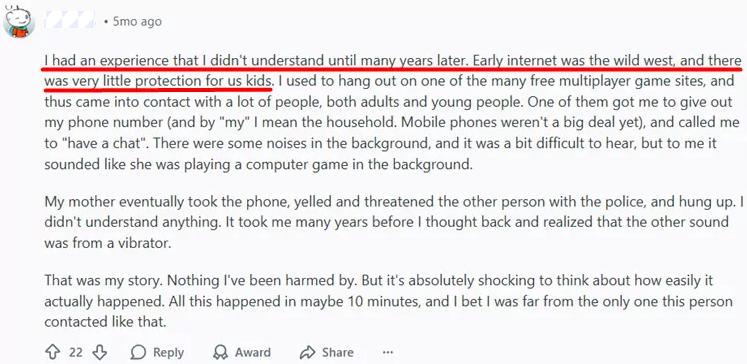
Online grooming typically begins with friendly, harmless-looking conversations. Predators often use private messages, comments, or shared interests to gradually build trust.
Users complained on Reddit that most of them have lured by predactors on social media or other websites. And at that time, they are too young to distinguish.
Without visibility into messaging patterns or suspicious interactions, parents may miss early red flags until the situation escalates.
Algorithm-Driven Feeds Increase Exposure to Harmful Content
Social media algorithms prioritize engagement over child safety. Once a child interacts with certain content, platforms may repeatedly recommend similar material.
This can include sexualized content, violence, extreme social comparison, or self-harm–related topics—often without the child actively searching for them.
Monitoring Is About Early Detection, Not Constant Surveillance
Responsible social media monitoring is not about reading every message or invading privacy. Its primary goal is to identify early warning signs, detect risky patterns, and enable timely conversations before problems become serious.
This approach becomes especially important as children grow older and full restrictions are no longer realistic.
Parental Control Apps for Social Media
Security.org's comprehensive testing of parental control apps in 2026 identified real-time content scanning and customizable keyword detection as essential features for modern social media monitoring. Their evaluation found that the most effective solutions combine AI-powered risk detection with low false-positive rates, enabling parents to intervene early without constantly reading every message. Based on these criteria and our hands-on testing, here are the leading solutions for different parental needs:
1. AirDroid Parental Control
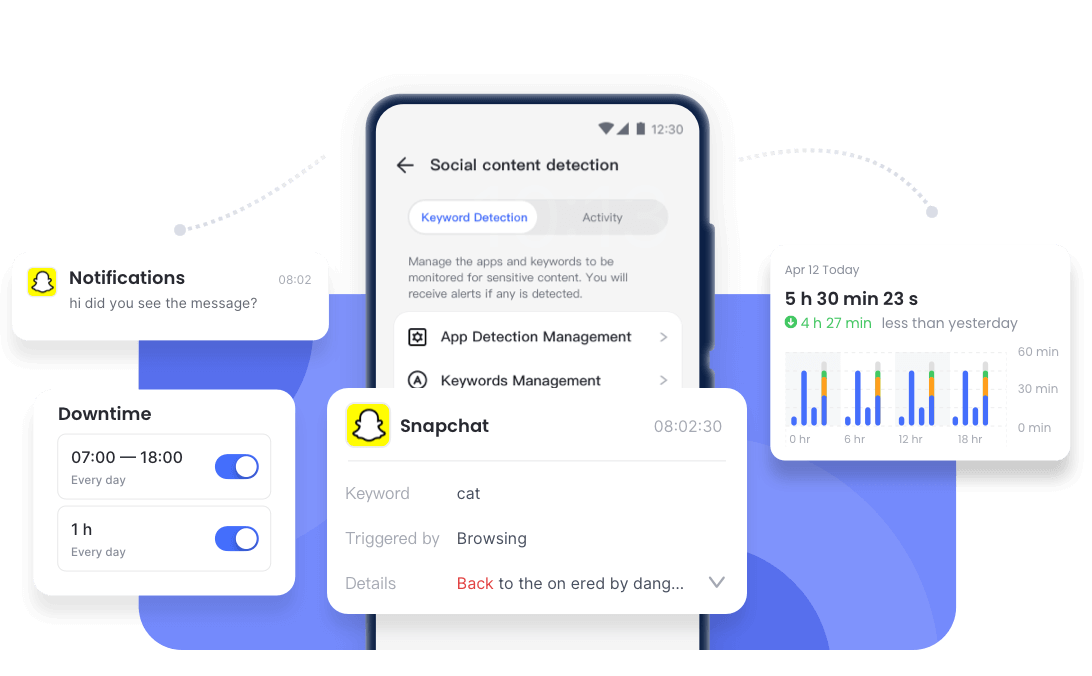
AirDroid Parental Control App is designed for your child's safety as a top priority. In addition to outstanding screen management and location tracking, it offers one of the most flexible and detailed social content monitoring.
It can effortlessly scans 14 + major social media(TikTok, Snapchat, WhatsApp, Instagram,etc) for signs of online risks, and will alert parents instantly, offering parents the power to intervene early.




Key features of social media monitoring:
- Content Detection: Humiliating, bullying, insulting, threatening, self-harm, offensive, and sexual content, etc.
- Customized Keywords: AI keyword assistant can create a relevant and comprehensive keyword list when parents describe their concerns.
- Instant Risk Notification: Get notified when detect keywords or inappropriate images.
- Wide Content Coverage: Can detect message conversion, search queries, browsed texts, and sent messages in social media platforms.
- Screen Mirroring & Notification Sync: Provides additional context, reducing false alarms and helping parents understand the situation.
Compatibility: Android, iOS, Web
Pricing: $2.50/month, annual
Pros:
- Highly flexible AI-powered keyword customization
- Real-time alerts for potential risks
- Comprehensive visible information
Cons:
- Social media monitoring features are limited on iOS devices
Best For: Parents who want precise, AI-powered, customizable social media monitoring, real-time alerts, and early risk detection—without relying solely on AI decisions.
2. Bark
Bark monitors text messages, emails, web activity, and 30+ social media platforms, focusing heavily on children's emotional and mental well-being. Instead of manual keyword entry, Bark uses a pre-built AI risk model to analyze conversations and alert parents only when potential risks are detected.
Key features of social media monitoring:
- Content Detection: Sexual content, cyberbullying, depression, violence, online predators, etc.
- AI Risk Detection: No setup on keywords, AI-assisted identifies risks.
- Conversation Analysis: Scans messages, comments, captions, and emails for emotional or safety risks.
- Expert-Based Guidance: Every alert comes with professional advice and tells parents the next steps to help children.
Compatibility: Android, iOS, Windows, Chromebook, Amazon Fire
Pricing: $8.25/month, annual
Pros:
- Provide professional advice with alerts
- Broad social platform coverage
- Keyword alert sensitivity can be adjusted
Cons:
- Keywords are not customizable
- The detection feature only works fully on Android
Best For: Parents who prioritize emotional well-being and want a broad platform coverage, and prefer hands-off alerts rather than manual keyword setup.
3. Qustodio
Qustodio is best known for screen time management and digital habit building, with limited but useful social media oversight. Its brand-new social monitoring feature keeps your kids safe across all their communications. Parents can get a push notification, and emails alert them the moment your child sends or receives any concerning messages.
For Android devices: Snapchat, TikTok, WhatsApp, X, Instagram, and LINE.
For iOS devices: WhatsApp and LINE.
Key features of social media monitoring:
- Content Detection: Bullying, depression, violence, drugs, body image, school absence, and illegal activity.
- No Setup: Message monitoring is automatically enabled on children's devices.
- Detailed View: Flags concerning messages with device, timestamp, and group name, and provides up to three message snippets.
- Healthy Schedule: Robust scheduling & time limit features to control social media apps usage.
Compatibility: Android, iOS, Windows, Mac, Chromebook, Kindle
Pricing: $4.58/month, annual
Pros:
- Healthy social media routines
- Real-time notifications and emails
- Up to three earlier messages for context
Cons:
- Few social media platforms are monitorable
- Social media monitoring features are limited on iOS devices
Best For: Parents with kids on mainstream social apps (Snapchat, TikTok, etc.) who want zero-setup content detection and balanced usage scheduling.
4. Canopy
Canopy leverages AI-powered protection to filter explicit sexual content, building a safer internet space for children. Its hands-off functionality can block thousands of known porn sites and apps, filter nudity and inappropriate images on TikTok and YouTube.
Key features of social media monitoring:
- Content Detection: Mainly focuses on sexting.
- No setup: Smart filter pornographic/sexual content.
Compatibility: Android, iOS, Windows, Chromebook
Pricing: $7.99/month for 3 devices or $9.99/month for 10 devices; all plans billed annually.
Pros:
- Real-time alter
- Removal protection
- Image/video detection to deter sexting
Cons:
- Prioritizes pornographic content filtering, overlooking other social media dangers
Best For: Parents who need robust explicit content protection and don't require full social media risk monitoring.
5. MMGuardian
MMGuardian supports 8 social media platforms monitoring, including Snapchat, TikTok, Messenger, WhatsApp, Kik, Instagram, Discord, SMS Texts. It enables parents to view texts and supported social media app messages, which offer more detail to ensure no critical information slips through the cracks.
Key features of social media monitoring:
- Content Detection: Online predator, violence, suicide ideation, drugs, alcohol, cyberbullying, sexting.
- Safety Alerts: Automatically scans messages and pictures to alert parents to the concern.
- Detailed View: View detailed reports of SMS texts and messages from supported social messaging apps
Compatibility: Android, iOS
Pricing: $4.16/month for 1 device or $8.33/month for 5 devices; all plans billed annually.
Pros:
- Detailed message reports
- Team up with CyberTipline to help catch predators
Cons:
- Fully limited monitoring of social apps on iOS devices
- Slightly more complicated UI
Best for: Parents who want direct access to view conversations along with summary alerts.
6. Google Family Link
Google Family Link is a good option for parents who are less familiar with software and have younger children(under 13) with basic monitoring needs, especially families already using the Google ecosystem. It can only monitor YouTube with 3 options set up, which are rated for viewers 9+, 13+, and unrestricted content access.
It allows parents to manage purchases and downloads, content restrictions for the right age, and restrict sexually explicit books on kids' devices. In this case, kids can only download apps that parents approved.
Key features of social media monitoring:
- Google Play Management: Controls social apps downloads and in-app purchases on kids' devices; only age-appropriate or parents-approved social apps are accessible.
- YouTube Content Filtering: Offers 3 preset age-based monitoring modes with automatic filtering enabled.
Compatibility: Kids – Android, Chromebooks; Parents – iOS, Android, Web Browsers
Pricing: Free
Pros:
- Free to Use
- Strong control on Google Play
Cons:
- Youth aged 13 and above may remove supervision
- Does not monitor content on trending social apps
Best For: Tech-newer parents with kids under 13, basic monitoring needs, and those within the Google ecosystem who want free Google Play and YouTube control.
Choose the Right Social Monitor App by Your Child's Age
It is important to note that kids' online needs shift as they grow older, and social media monitoring strategies should be suitable for their age group.
1. Under 10: Supervision + Limits
- Children at this age should focus on screen time, not social media monitoring.
- Focus on healthy habits on a schedule of screen time.
2. 10–13: Hybrid Control + Early Alerts
Common Sense Media recommends that children aged 10–13 require a hybrid approach combining early conversation about online risks with technical safeguards. At this developmental stage, their prefrontal cortex is still developing impulse control, making guided independence the most effective strategy.
- Early conversation on social media about harmful information, and be wary of strangers.
- Use keyword detection, content filters, and app usage reports.
- Appropriate intervention when a child shows signs of addiction.
3. 13–18: Risk Awareness, Privacy Respect, Trust-Based Monitoring
- With teens' consent, value their own minds.
- Focus mainly on risk detection.
Key Social Media Risks Parents Should Monitor
Research from Internet Matters 'Vulnerable Children in a Digital World' report indicates that vulnerable children often experience a 'basket of all High-Risk Online Scenarios' rather than isolated incidents, with risks accumulating through multiple online interactions and extended time spent online. Early detection through monitoring tools is therefore critical for effective protection.
Key social media risks parents should monitor:
- Cyberbullying and emotional harassment
- Online predators and suspicious contacts
- Explicit, sexual, or age-inappropriate content
- Self-harm, depression, and mental health signals
- Excessive scrolling and addictive usage patterns
- Platform-specific risks (tiktok, instagram, snapchat)
Final Verdict for Parents
Parental control apps for social media monitoring are the most effective way protect kids from online risks. The main goal is to spot danger in real time, start a good conversation, and keep kids well-protected in a complex digital world.
The best app is based on your child's age, personality, online behavior, and parents need.
FAQs about Monitoring Apps
List of Sources
- Quick Guide: Which Social Media Monitoring App Is Right for You?
- Pew Research Center - Teens, Social Media and Technology 2024 (https://www.pewresearch.org/internet/2024/12/12/teens-social-media-and-technology-2024/ )
- Pew Research Center - Teens, Social Media and AI Chatbots 2025 (https://voz.us/en/society/251214/31763/teens-social-networks-and-ai-chatbots-in-2025-this-is-how-generation-z-navigates-according-to-pew-research.html )
- Why Monitoring Children's Social Media Is Necessary
- Kaspersky - Freedom and Responsibility: 48% of Parents Use Parental Control Apps (https://www.kaspersky.com/about/press-releases/freedom-and-responsibility-48-of-parents-use-parental-control-apps )
- Parental Control Apps for Social Media
- Security.org - Best Parental Control Apps of 2026 (https://www.security.org/parental-controls/best/ )
- MMGuardian - Best iPhone Parental Control Apps 2026 (https://www.mmguardian.com/blog/best-iphone-parental-control-apps-2025 )
- Bark Official Website (https://www.bark.us )
- Qustodio Official Website (https://www.qustodio.com )
- Google Family Link (https://families.google.com/familylink/ )
- Choose the Right Social Monitor App by Your Child's Age
- Common Sense Media - Social Media Age Recommendations (https://www.commonsensemedia.org/ )
- Key Social Media Risks Parents Should Monitor
- Childnet - Vulnerable Children in a Digital World (https://www.childnet.com/wp-content/uploads/2020/02/Internet-Matters-Report-Vulnerable-Children-in-a-Digital-World.pdf)










Leave a Reply.