Automating Device Health Monitoring: Turning Routine Into Repeatable Workflows
When you think about device health monitoring, how many tasks come to mind? Checking for offline devices. Confirming battery levels. Making sure storage isn't full. Watching for apps that have stopped running.
Many teams already run these checks manually, often in the same order. The routine lives with the people who run it—undocumented and not automated.
In practice, it's a repeatable sequence of steps: a hidden SOP. That also makes it a strong candidate for automation. In this post, we'll look at how to turn those manual checks into a reusable, automated workflow and make a hidden SOP visible and executable.
1What Device Health Monitoring Usually Involves
Whether or not it's ever been documented as a process, the people responsible for a fleet tend to check the same handful of things.
Check | Standardized Task | Difficulty | What It Involves |
|---|---|---|---|
| Is the device online right now? | Device Online Status Check | Simple | Confirm the device can actually be reached |
| Does it have enough battery for the time ahead? | Battery Level Check | Simple | Confirm current charge will hold up |
| Is storage running low? | Storage Capacity Check | Simple | Confirm there's room for the next update or action |
| Is the required app actually running? | App Running Status Check | Medium | Confirm it hasn't silently stopped, not just that it's installed |
| Is the network connection working? | Network Connectivity Check | Medium | Confirm data is passing through, not just technically online |
| Has the device been offline unusually long? | Long-Term Offline Check | Simple | Separate a brief drop from a device that's effectively gone |
| Is CPU or memory usage climbing? | Resource Usage Check | Complex | Confirm the device isn't straining before something breaks |
If several of these already come up regularly for your team, not as one-off checks but as something that happens the same way every time, that recurring set is already functioning as a standard operating procedure. It just hasn't been treated like one yet.
2What Counts as a Device Health Monitoring SOP
As the table above shows, device health monitoring covers a range of tasks, some simple, some more involved. What makes something an SOP isn't how complicated it is. It's whether the task is routine and repeated the same way each time, without needing extra judgment calls inserted along the way.
An SOP here doesn't need to mean something elaborate, and it doesn't require any automation yet either. It can take shape in one of two ways, both still fully manual at this stage.
A Single Task Can Already Be the Whole SOP
Take the long-term offline check as an example.
Done manually, it looks something like this: someone opens the console, filters devices by how long they've been offline, reviews the list, and flags or notifies whoever owns each device. Detection, filtering, and follow-up all happen in one continuous pass, by hand, every time it's run. Nothing about it changes from one run to the next.
That consistency is what makes it a complete procedure on its own, even before anyone thinks about automating it.
Several Tasks Together Can Also Form an SOP
Say a team's device health monitoring routine needs to cover three things: offline devices, battery levels, and resource usage. Each of those is checked manually for a different reason: offline tells you what's unreachable, battery tells you what won't last, resource usage tells you what's straining.
On their own, they're three unrelated manual tasks. What turns them into one SOP is that the team runs all three, every time, for the same underlying purpose, confirming the fleet is fit to operate before the day starts.
The procedure lives in the habit of running them together for that purpose. It has nothing to do with whether the three tasks are technically connected to each other, they aren't.
3Turning These Tasks Into Repeatable Workflows
Knowing that these routine checks already form an SOP is one thing. Running them by hand every time is another, and it's the part that doesn't scale: someone has to remember to do it, do it the same way, and not skip a step when they're busy.
So what happens when a task like this, routine, consistent, and not requiring any judgment call in the moment, gets turned into something that runs on its own instead of depending on someone's memory? The manual steps get replaced by a workflow that runs the same way every time, without anyone needing to remember to start it.
AirDroid Business already provides automated workflow templates built around these common tasks, so the checks above don't have to start from a blank canvas. How much of that a team uses, and how connected the pieces are, comes down to three levels of effort.
Turn Routine Checks into Automated Workflows
Go beyond traditional MDM with early access to intelligent automation that helps streamline routine tasks and keep device operations running smoothly. Share your goals, and our team will review your request and follow up with next steps.
Level 1: Pick Templates From the Library
Selecting Learn More on a listed template opens the GoInsight.AI Marketplace, where the full catalog can be browsed. Choosing to use a template instead goes straight into the workflow builder, where it deploys and runs on its own. This is the fastest path: no building required, just selecting which checks apply to a given fleet.
Level 2: Build Connections Yourself
If one template's output should feed into another, rather than each running independently, that logic can be recreated inside the same workflow builder. It takes more effort and some familiarity with how the canvas works, but it's something a team can do without outside help.
Level 3: Have It Built for You
If templates need to be connected but building that isn't something a team wants to take on, the option is to contact the AirDroid Business team directly with what's needed. This isn't a self-serve option, and it isn't instant, but it's available for cases that call for it.
4Use Cases: Checks Before Operations Begin
Picking one task or several for a given SOP depends on what actually needs covering before a shift or a route starts. Using pre-shift device health monitoring as the example, here are two approaches, one narrower, one broader.
One Task: Checking for Offline Devices
In this pre-shift check, all that's needed is visibility into which devices are unreachable before the day starts. This assumes the fleet is already enrolled in AirDroid Business, since a device has to be registered before its status can be queried at all.
With that in place, the Offline Device Query and Export template covers the check on its own: set the number of days, anywhere from 1 to 90, and it filters every device offline for at least that long, then returns a report with an online link. One template, one task, nothing else required.
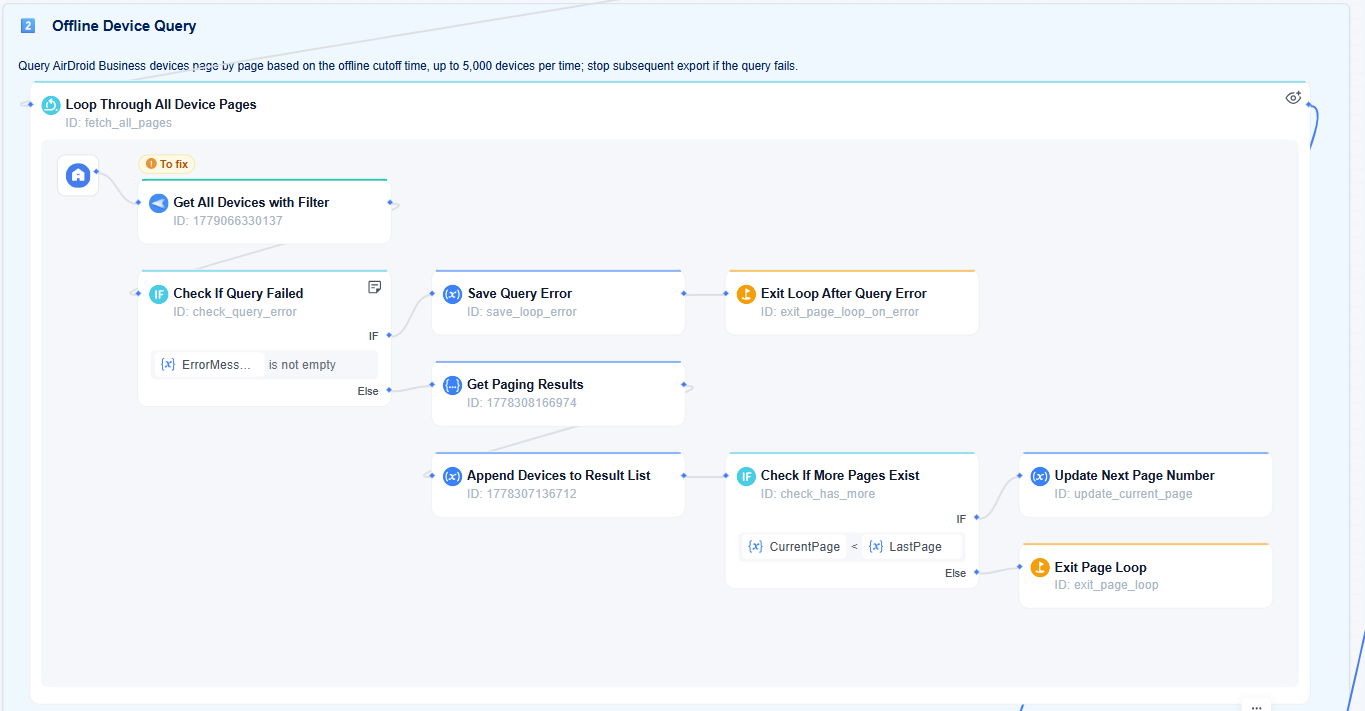
Workflow snippet
Several Tasks Together: A Broader Check
For the same pre-shift check, say more than connectivity needs confirming. As with the single-task version, this assumes the devices are already enrolled and visible in AirDroid Business. Three templates, each already covering one part of the picture, can be deployed side by side rather than connected:
- Offline Device Query and Export flags which devices are unreachable.
- Device Battery Data Query and Send to Outlook pulls battery level, charging status, health, and temperature for the devices in scope, and emails the report link.
- Device Resource Usage Query and Email Alert pulls current CPU and storage figures and emails those as well. Despite the name, this one reports the numbers as they stand; it doesn't judge whether a reading counts as abnormal. That judgment, as a dedicated alert, is what's rolling out shortly.
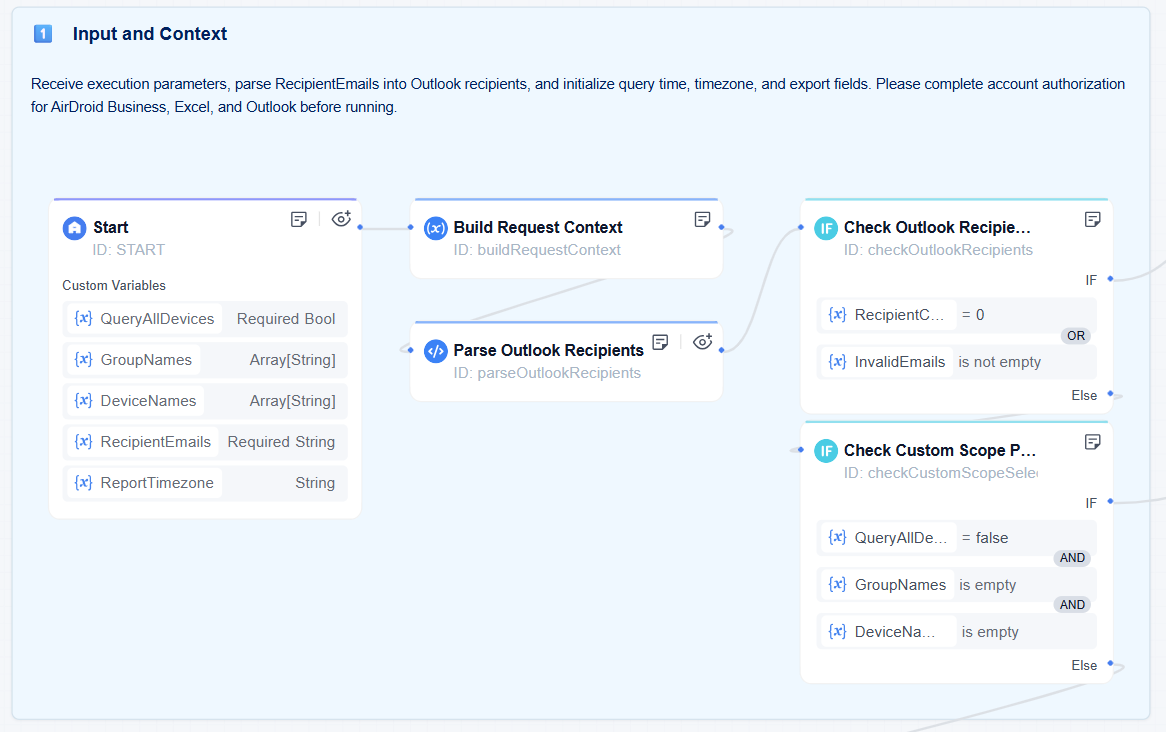
Workflow snippet
None of these three templates exchange data with each other. What makes this a single SOP isn't a technical link between them, it's that the team runs all three every time, for the same pre-shift purpose, as a fixed set.
More Templates for a Fuller Pre-Shift Check
Beyond the two examples above, a fuller pre-shift device health check usually covers more ground.
Task | Template | What It Covers |
|---|---|---|
| Kiosk Lockdown Check | Kiosk Abnormal Response | Confirms Kiosk mode hasn't dropped out of its locked state |
| Configuration Verification | Policy and Kiosk Status Query and Export | Verifies configuration is actually in effect, not just assigned |
| Manageability Check | Daemon Version and Permission Compliance Check | Confirms the device is still reachable for management, not just online |
| Permission Integrity Check | Biz Daemon Permission Abnormal Handling | Catches permission issues that would block remote actions later |
| App Recovery Check | App Launch Failure Auto-Recheck and Retry | Confirms the app that matters is running, and retries if it isn't |
| Critical App Uptime Check | Critical Business App Not Running: Inspection and Notification | Flags when a required app has stopped without anyone noticing |
| All-in-One Readiness Check | Pre-Business Key Device Check | A packaged check built around confirming devices are ready before operations start |
| Store-Level Readiness Check | Retail Store Opening Readiness Check and Zone Notification | The same idea, scoped and routed by store or zone |
Note: Some of what's listed here may not be live in every account yet. Check your own console for what's currently available before planning around it. For a combination more specific than what's published, reaching out to the AirDroid Business team is the way to get it built.
5Start With What Already Exists
Everything covered here is a routine you run once a shift or once a day, not something that watches continuously in the background. A team that needs an ongoing setup, one that tracks health signals over time and defines standards per device role, is looking at a different piece of work, covered in How to Monitor Android Device Health Remotely.
This pattern isn't unique to device health monitoring, either. Most teams already have similar unwritten routines in other parts of their operations. If those routines are just as consistent, repeated the same way, for the same purpose, without needing a judgment call in the moment, the same approach applies there too: turn the habit into a defined set of automated workflows (SOP), and it stops depending on someone remembering to run it.











Leave a Reply.