
Retail businesses need a variety of devices to manage sales, track inventory, support employees, and enhance customer experience. Whether it's a point-of-sale (POS) terminal or an Android handheld device, these devices need to be secure, up-to-date, and readily available in daily operations.
Mobile Device Management (MDM) helps IT teams manage these devices from a central console, deploy applications, enforce security policies, and troubleshoot remotely.
However, not all MDM solutions are the same for all retail environments. Finding the right solution depends on prioritizing the devices you use, the applications your business relies on, and the control your IT team requires.
This guide compares eight retail MDM solutions, explains the hardware and management requirements to consider, and outlines best practices for keeping retail devices running reliably.
Part 1. Core Evaluation Criteria for Retail MDM
When evaluating MDM (Mobile Device Management) solutions for the retail sector, certain key factors are paramount. Our recommendations below will focus on these core dimensions, ensuring they align with the unique demands of retail operations:
- Rapid Deployment and Ease of Use:
Can the solution enroll and configure devices in bulk with minimal manual work, even for non-IT staff? - Point of Sale (POS) and Core Retail App Support:
Does it effectively support critical retail applications like POS systems, inventory management, and CRM tools? - Device Security and Compliance:
How well does it protect sensitive data and devices, ensuring adherence to industry regulations like PCI DSS (Payment Card Industry Data Security Standard) and internal policies? - Robust Remote Troubleshooting and Support:
Can IT teams diagnose and resolve device issues without visiting each store? - Cost-Effectiveness and Scalability:
Can the solution support your current deployment and grow as you add devices or locations?
Part 2. Retail Devices to Consider When Choosing an MDM Solution
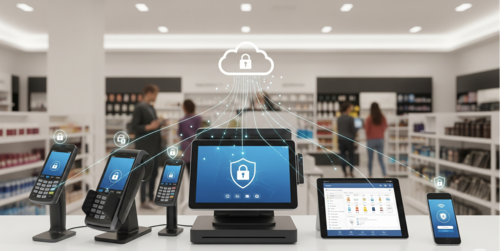
Retail businesses use more than smartphones and tablets. Many rely on dedicated devices designed for specific tasks, and each device type may have different management requirements.
Retail businesses use different types of devices across stores, warehouses, and distribution operations. Before selecting an MDM solution, identify the hardware in your environment and understand its specific management needs.
Common Device Types in Retail
Device Type | Common Uses | Key MDM Requirements |
|---|---|---|
| POS Terminals | Processing transactions and payments | Application management, access restrictions, remote troubleshooting |
| Barcode Scanners and Handhelds | Scanning products, checking inventory, and fulfilling orders | Application deployment, device configuration, remote monitoring |
| Rugged Android Devices | Stockroom operations, warehouse inventory, and logistics | Model compatibility, application management, kiosk mode, remote support |
| Self-Service Kiosks | Customer self-service, ordering, and information lookup | Kiosk lockdown, application auto-launch, remote configuration |
| Digital Signage Displays | Showing promotions, menus, and product information | Content and application deployment, device monitoring, remote recovery |
Rugged Android Devices and Their MDM Requirements
Rugged Android devices are built for demanding work environments such as stockrooms, warehouses, and distribution centers. Many models include integrated barcode scanners and other features that support inventory checks, order fulfillment, and in-store operations.
Zebra is one example of a manufacturer offering rugged Android handhelds widely used in retail and logistics. Managing these devices may involve more than installing apps or applying standard device policies. Businesses may also need to configure hardware features, restrict device use to specific applications, monitor device status, and troubleshoot issues remotely.
Not every MDM solution supports every rugged device or its full range of hardware features. Before choosing a platform, check compatibility with your specific device models and Android versions, as well as support for the hardware functions your workflows depend on. For more details, see our guide to Zebra device management.
What to Look for in an MDM Solution for Retail Hardware
Once you know which devices you’re managing, assess MDM solutions against these key requirements:
- Device Compatibility: Does the solution support your specific hardware models and operating system versions?
- Application Management: Can IT teams deploy, update, and configure business applications in bulk?
- Kiosk and Access Control: Can dedicated devices be restricted to approved applications and workflows?
- Remote Support: Can administrators monitor devices, access them remotely where supported, and troubleshoot issues?
- Monitoring and Automation: Can the platform detect device problems, send alerts, and trigger supported recovery actions?
Part 3. Best 8 MDM Solutions for Retail
Retail MDM solutions vary in their device compatibility, management capabilities, and suitability for different business environments.
In the following reviews, we'll focus on each platform's retail-relevant features, practical strengths, and key considerations, including how well it supports the devices and workflows discussed above.
1AirDroid Business
Android-focused retail management
👍 Best for: Retail businesses managing Android POS devices, kiosks, digital signage, and other dedicated endpoints across multiple locations.
G2 Rating: 4.9/5
Pricing: Starts at $12 per device per year (annual billing). Custom plans are available for larger deployments.
AirDroid Business helps retail IT teams manage company-owned Android devices and Windows endpoints across stores. It brings app management, kiosk controls, and device monitoring into one smart console, with remote access for Android devices. Also, AI-assisted device queries and automated workflows help teams find devices that need attention and follow up on recurring alerts.
Key Features:
- Rapid Deployment & Ease of Use: Offers zero-touch enrollment and an intuitive dashboard for quick setup and daily management of numerous devices.
- POS & Core Retail App Support: Provides robust app management features including silent install, forced updates, version control, and Kiosk Mode to lock devices to specific retail applications (e.g., POS, inventory).
- Device Security & Compliance: Features remote lock, wipe, and factory reset for lost or stolen devices, a secure kiosk mode with app whitelisting, and Geofencing for location-based security policies. AirDroid Business helps retailers maintain compliance with data security standards.
- Robust Remote Troubleshooting & Support: Includes powerful remote control, screen mirroring, and unattended access, allowing IT teams to troubleshoot issues on store devices efficiently without being physically present. Includes powerful remote control, screen mirroring, and unattended access. Features like Black Screen Mode for privacy, voice calls, and remote camera access during remote sessions streamline troubleshooting, significantly reducing device downtime.
- Alerts and Workflows: Monitor device conditions and configure automated responses to supported events.
Considerations
- Businesses with mixed-OS environments should check whether its platform coverage meets their needs.
2SOTI MobiControl
Rugged device and frontline operations management
👍 Best for: Enterprise-Level Retail Deployments with Diverse Device Types
G2 Rating: 4.3/5
Pricing: Available upon request (enterprise-focused).
SOTI MobiControl is an enterprise mobility management solution designed to manage and secure business-critical devices. It is particularly relevant to retail and logistics environments where employees rely on rugged handhelds, barcode scanners, and other specialized mobile equipment.
Key Features:
- Rapid Deployment & Ease of Use: Supports a wide range of enrollment methods and provides an extensive policy management engine.
- POS & Core Retail App Support: Strong in managing a diverse fleet of devices, including ruggedized scanners and dedicated POS terminals, ensuring stable application delivery.
- Device Security & Compliance: Offers advanced security features like secure content management, granular access controls, and compliance reporting tailored for enterprise needs.
- Robust Remote Troubleshooting & Support: Provides remote view and control for various operating systems, along with script execution for automated fixes.
- Cost-Effectiveness & Scalability: Designed for large-scale deployments, offering comprehensive features that justify its enterprise-level pricing.
Considerations
- Check compatibility with your specific device models, OS versions, and hardware features.
3VMware Workspace ONE UEM
Broad enterprise endpoint management
👍 Best for: Unified Endpoint Management (UEM) for Blended Retail Workforces
G2 Rating: 4.4/5
Pricing: Tiered pricing, contact sales for a quote.
Workspace ONE UEM is an enterprise unified endpoint management platform for managing devices across different operating systems. It may suit larger retail organizations that need centralized control over a diverse endpoint environment.
Key Features:
- Rapid Deployment & Ease of Use: Integrates with existing enterprise infrastructure for streamlined onboarding and identity management.
- POS & Core Retail App Support: Manages both traditional mobile devices and purpose-built retail endpoints, supporting seamless access to all business applications.
- Device Security & Compliance: Offers conditional access, data loss prevention (DLP), and extensive compliance frameworks, ideal for managing corporate and employee-owned devices.
- Robust Remote Troubleshooting & Support: Provides remote assistance capabilities and detailed device analytics for proactive problem solving.
- Cost-Effectiveness & Scalability: A comprehensive UEM platform that scales for large organizations with diverse device and user needs.
Considerations
- Verify support for retail-specific hardware, kiosk requirements, and the features included in your selected plan.
4Hexnode UEM
Multi-platform and kiosk management
👍 Best for: Multi-OS Device Management and Kiosk Mode Customization
G2 Rating: 4.5/5
Pricing: Starts at $1.00 per device per month (billed annually).
Hexnode UEM provides centralized device management across multiple operating systems, with capabilities for kiosk deployment, application management, and remote administration. Its support for specialized Android environments also makes it relevant to retailers using dedicated devices.
Key Features:
- Rapid Deployment & Ease of Use: Offers multiple enrollment methods, including zero-touch options, and an intuitive console for easy management across various operating systems.
- POS & Core Retail App Support: Provides robust kiosk mode with highly customizable layouts and application whitelisting for dedicated POS devices, digital signage, and self-service kiosks. Supports seamless app distribution for diverse retail applications.
- Device Security & Compliance: Enforces granular security policies, location tracking, remote lock/wipe, and robust compliance auditing features to meet industry standards and protect sensitive data.
- Robust Remote Troubleshooting & Support: Features remote view and control capabilities for various platforms, along with robust reporting and alerts to proactively manage device health and resolve issues.
- Cost-Effectiveness & Scalability: Offers competitive pricing plans suitable for businesses of all sizes, with scalable features to accommodate growing device fleets and expanding retail operations.
Considerations
- Available hardware controls depend on device models, manufacturers, and integrations.
5Jamf Pro
Apple device management in retail
👍 Best for: Apple-First Retail Environments
G2 Rating: 4.8/5
Pricing: Starts at $3.33 per device per month (billed annually).
Jamf Pro is a device management platform built specifically for Apple environments. It helps IT teams configure, secure, and manage Mac, iPhone, iPad, and Apple TV devices throughout their lifecycle.
Key Features:
- Rapid Deployment & Ease of Use: Specializes in Apple device management, offering zero-touch deployment for iPhones, iPads, and Macs, ideal for Apple-centric retail stores.
- POS & Core Retail App Support: Optimizes app delivery and configuration specifically for iOS devices, crucial for retail apps running on iPads as POS or clienteling tools.
- Device Security & Compliance: Provides comprehensive security for Apple devices, including encryption enforcement, patch management, and strict policy controls.
- Robust Remote Troubleshooting & Support: Offers extensive remote management capabilities, including remote wiping, locking, and troubleshooting specific to Apple's ecosystem.
- Cost-Effectiveness & Scalability: While Apple-specific, it's highly scalable for retailers with large fleets of Apple devices.
Considerations
- Designed for Apple environments, so retailers with Android devices will need additional management coverage.
6MobileIron (Ivanti Endpoint Manager Mobile)
Enterprise mobile device management
👍 Best for: Secure Mobile Access for Retail Employees
G2 Rating: 4.6/5
Pricing: Available upon request.
Ivanti Neurons for MDM is an enterprise mobility management solution for organizations that need to manage and secure mobile devices. It is worth evaluating for retail businesses with distributed workforces and mobile endpoints.
Key Features:
- Rapid Deployment & Ease of Use: Streamlined device enrollment and management with a focus on user experience.
- POS & Core Retail App Support: Ensures secure access to enterprise apps and content, critical for retail staff needing secure access to inventory or customer data.
- Device Security & Compliance: Strong data security features, including encrypted containers for sensitive data, and comprehensive compliance reporting.
- Robust Remote Troubleshooting & Support: Provides remote device management and configuration, allowing IT to resolve issues quickly.
- Cost-Effectiveness & Scalability: Offers scalable solutions for various business sizes, focusing on security and productivity.
Considerations
- Check whether its device coverage, kiosk features, and remote support capabilities match your retail environment.
7SureMDM by 42Gears
Rugged devices and specialized endpoint management
👍 Best for: Dedicated Device Management for Diverse Retail Endpoints
G2 Rating: 4.4/5
Pricing: Starts at $4.99 per device per month.
SureMDM is an endpoint management solution from 42Gears. It supports businesses managing mobile devices, rugged hardware, kiosks, and other specialized endpoints.
Key Features:
- Rapid Deployment & Ease of Use: Simple setup and a user-friendly console for managing a wide array of device types.
- POS & Core Retail App Support: Excellent kiosk mode and application lockdown features for dedicated retail devices like POS terminals, digital signage, and barcode scanners.
- Device Security & Compliance: Provides strong security controls, remote wipe/lock, and real-time device monitoring for compliance.
- Robust Remote Troubleshooting & Support: Features remote control and file transfer, enabling IT to diagnose and fix issues on remote devices efficiently.
- Cost-Effectiveness & Scalability: Flexible pricing models and highly scalable to manage a large and diverse fleet of retail-specific devices.
Considerations
- Verify compatibility with your specific device models and required hardware functions.
8ManageEngine Mobile Device Manager Plus
Centralized mobile device administration
👍 Best for: Integrated IT Management for Mid-sized Retailers
G2 Rating: 4.6/5
Pricing: Starts at $0.42 per device per month (billed annually).
ManageEngine Mobile Device Manager Plus is a mobile device management solution that helps IT teams manage and secure business-owned and employee-used mobile devices. It may suit retail organizations looking for centralized administration across distributed teams.
Key Features:
- Rapid Deployment & Ease of Use: Offers simplified enrollment and intuitive policy configuration, ideal for IT teams managing various endpoints.
- POS & Core Retail App Support: Supports comprehensive application management, including app store integrations and enterprise app deployment, suitable for various retail applications.
- Device Security & Compliance: Provides robust security features like geo-fencing, data loss prevention, and strong access controls.
- Robust Remote Troubleshooting & Support: Features remote control, shadow IT, and extensive reporting to quickly address device issues.
- Cost-Effectiveness & Scalability: Available as both on-premises and cloud solutions, offering flexible licensing options for growing retail businesses.
Considerations
- Check support for your POS, kiosk, and rugged device requirements, particularly specialized hardware controls.
Retail MDM Solutions at a Glance
The eight platforms differ in their device coverage and areas of focus. Check the table below as a starting point for narrowing down your options.
Solution | Main Area to Evaluate | Particularly Relevant Retail Devices |
|---|---|---|
| AirDroid Business | Android management, remote access, monitoring, and kiosk controls | Android POS, kiosks, digital signage |
| SOTI MobiControl | Enterprise mobility and rugged device management | Rugged handhelds, barcode scanners |
| Workspace ONE UEM | Broad enterprise endpoint management | Mixed enterprise endpoints |
| Hexnode UEM | Multi-platform and kiosk management, OEM integrations | Kiosks, mobile devices, rugged Android |
| Jamf Pro | Apple device management | iPads, iPhones, Apple devices |
| Ivanti Neurons for MDM | Enterprise mobile management and security | Managed mobile devices |
| SureMDM | Rugged device and specialized endpoint management | Zebra, Honeywell, Datalogic devices |
| ManageEngine MDM Plus | Centralized mobile device administration | Managed mobile devices |
How to Choose the Right Retail MDM Solution
There is no single MDM platform that fits every retail environment. The right choice depends on the devices you manage and the operational challenges you need to address.
- If you mainly manage Android POS devices, kiosks, or digital signage: Prioritize Android device management, kiosk controls, remote access, and monitoring.
- If your employees rely on rugged handhelds: Look closely at OEM compatibility, barcode scanner support, and hardware-specific configuration options.
- If your stores use a mix of operating systems: Consider platforms with the endpoint coverage and centralized management capabilities your IT team needs.
- If you operate primarily with Apple devices: Evaluate Apple-focused management solutions and their deployment and security features.
- If you manage devices across many locations: Prioritize remote troubleshooting, centralized application deployment, device monitoring, and alerting.
Before making a decision, test the solution with the actual devices and applications used in your stores. A feature listed on a product page does not always guarantee compatibility with every device model or business workflow.
Part 4. Retail MDM Best Practices
Implementing MDM effectively in a retail environment requires more than just choosing the right solution. Follow these best practices to maximize your investment:
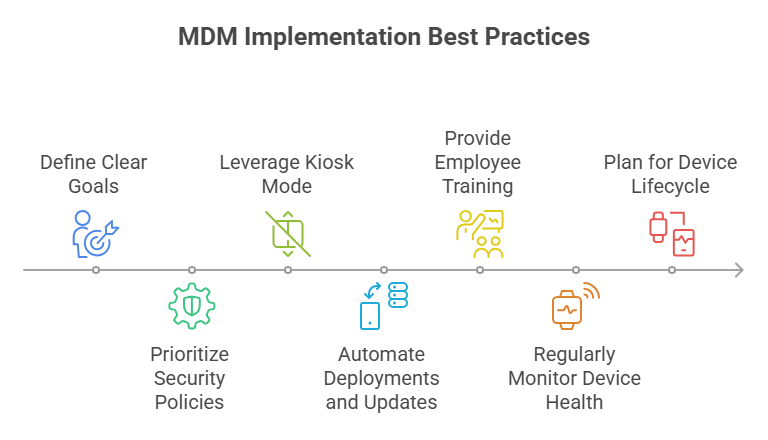
1. Define Clear Goals
Clearly outline what you aim to achieve with MDM (e.g., enhanced security, faster POS updates, reduced downtime) before selection.
2. Prioritize Security Policies
Implement robust security policies, including strong password requirements, data encryption, and regular security audits, especially for devices handling payment information.
3. Leverage Kiosk Mode
For dedicated-purpose devices (like POS terminals or customer self-service kiosks), utilize kiosk mode to lock them down to specific applications, preventing unauthorized use and distractions.
4. Automate Deployments and Updates
Use zero-touch deployment and automated app updates to significantly reduce manual IT effort and ensure all devices run the latest, most secure software.
5. Provide Employee Training
Educate your retail staff on device usage best practices, security protocols, and how to report issues, empowering them to use devices responsibly.
6. Regularly Monitor Device Health
Use MDM's reporting and monitoring features to proactively identify device issues, battery health, and compliance deviations, addressing them before they impact operations.
7. Plan for Device Lifecycle
Have a clear strategy for device provisioning, usage, maintenance, and eventual secure decommissioning or repurposing.
Part 5. FAQs



Leave a Reply.